
Hoicko.ai Human Recourse Management System — Key Features Documentation
 Hoicko.ai Human Recourse Management System — Key Features Documentation
Overview: The Hoicko HRM system is a comprehensive Human Resource Management platform built on the Hoicko workspace. It is designed to streamline daily HR operations — from employee self-service to administrator oversight — through two primary views: My Workspace (employee-facing) and Administrator (HR/admin-facing).
PART 1 — My Workspace
The My Workspace tab is the employee's personal HRM dashboard, providing real-time status, quick actions, and access to all individual HR tools.
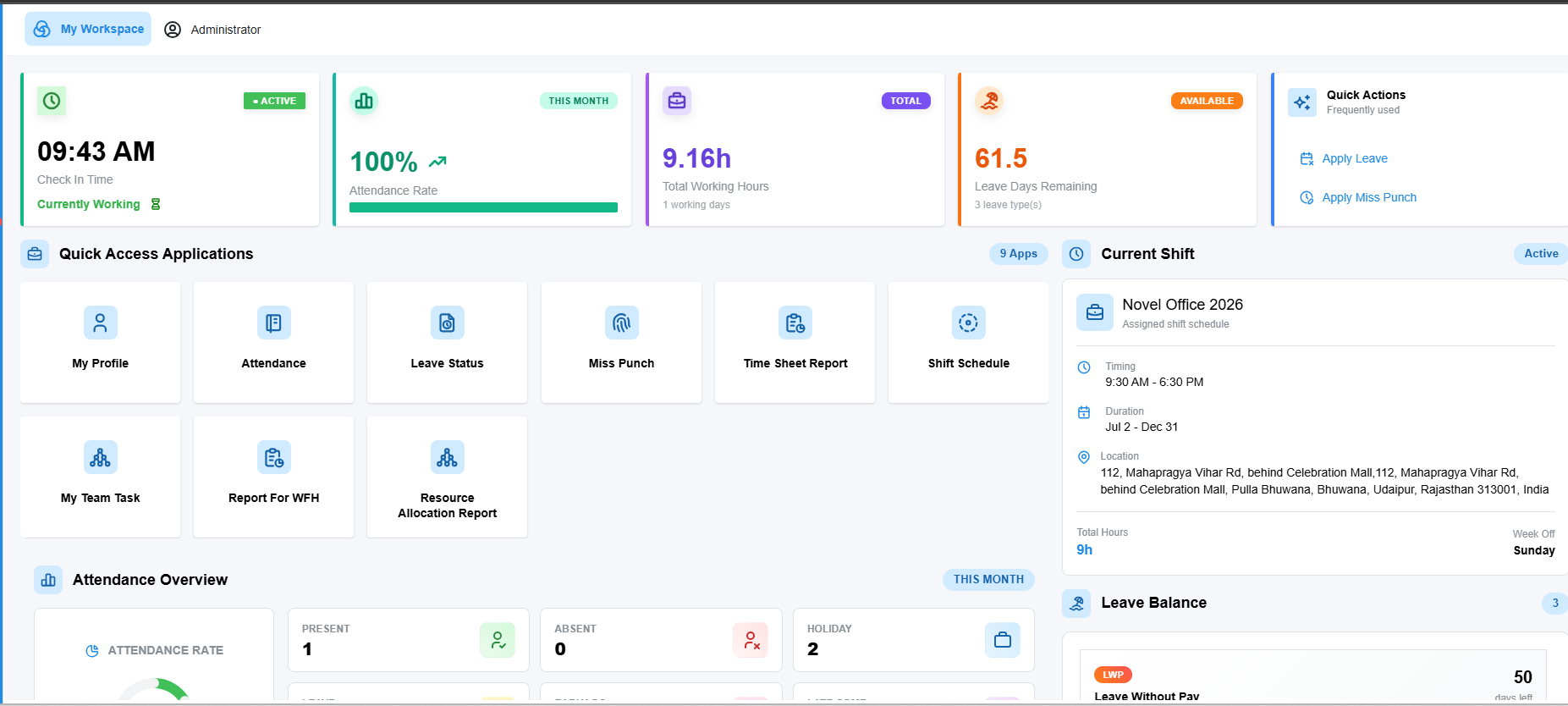
1.1 Top-Level Dashboard KPIs
When an employee logs in, the dashboard header immediately displays four key live metrics:
|
KPI |
Description |
Example Value |
|
Check-In Time & Status |
Shows current check-in timestamp with live "Currently Working" / Active indicator |
09:43 AM — Active |
|
Attendance Rate (This Month) |
Monthly attendance percentage with a progress bar for punctuality record |
100% |
|
Total Working Hours |
Cumulative working hours for the current period |
9.16h (1 working day) |
|
Leave Days Remaining |
Available leave balance across all leave types |
61.5 days (3 leave types) |
1.2 Quick Actions Panel
A dedicated Quick Actions section provides one-click shortcuts for the most frequently used HR operations:
· Apply Leave — Opens the leave application form directly.
· Apply Miss Punch — Allows employees to raise a correction request for missed biometric/digital punches.
1.3 Current Shift Information
The dashboard displays the employee's active shift details in real-time:
· Shift name (e.g., "Hoicko Office 2026")
· Working hours / timing (e.g., 9:30 AM – 6:30 PM)
· Validity duration (e.g., Jul 2 – Dec 31)
· Work location address
· Total daily hours and designated week-off day
1.4 Quick Access Applications (9 Apps)
The employee workspace provides 9 dedicated application tiles for self-service HR operations:
My Profile
Provides access to the employee's personal information and HR profile data.
Attendance
Opens the personal Attendance Report with a monthly calendar view. Tracks the following daily statuses:
· Present, Absent, Holiday
· Leave, Early Go, Late Come
· Work From Home, Week Off
Displays an attendance rate donut chart and allows employees to apply leave directly from this module.
Leave Status
Provides full Leave Management access with two sub-views:
· Leave Summary — Table view showing leave requests with Reason, Leave Type, Status, Level 1 Approver, Start Date, End Date, and Attachments.
· Leave Balance — Shows remaining leave balance per type (LWP, PL, etc.) with usage progress bars.
Employees can raise new requests via the "Apply Leave Request" button.
Miss Punch
Allows employees to submit a Miss Punch correction request if they missed clocking in or out. Includes reason documentation and a multi-level approval workflow.
Time Sheet Report
Provides access to the employee's detailed time sheet, showing working hours logged per day for tracking and review.
Shift Schedule
Shows the assigned shift schedule details, timing, validity, and location information.
My Team Task
Allows employees and managers to view and manage tasks allocated to their team, enabling project and task tracking within the HRM context.
Report For WFH (Work From Home)
Enables employees to view and submit Work From Home records and reports, tracking WFH days and approval status.
Resource Allocation Report
Provides a view of how employees are allocated across projects or tasks, supporting workforce utilization tracking.
1.5 Attendance Overview Widget
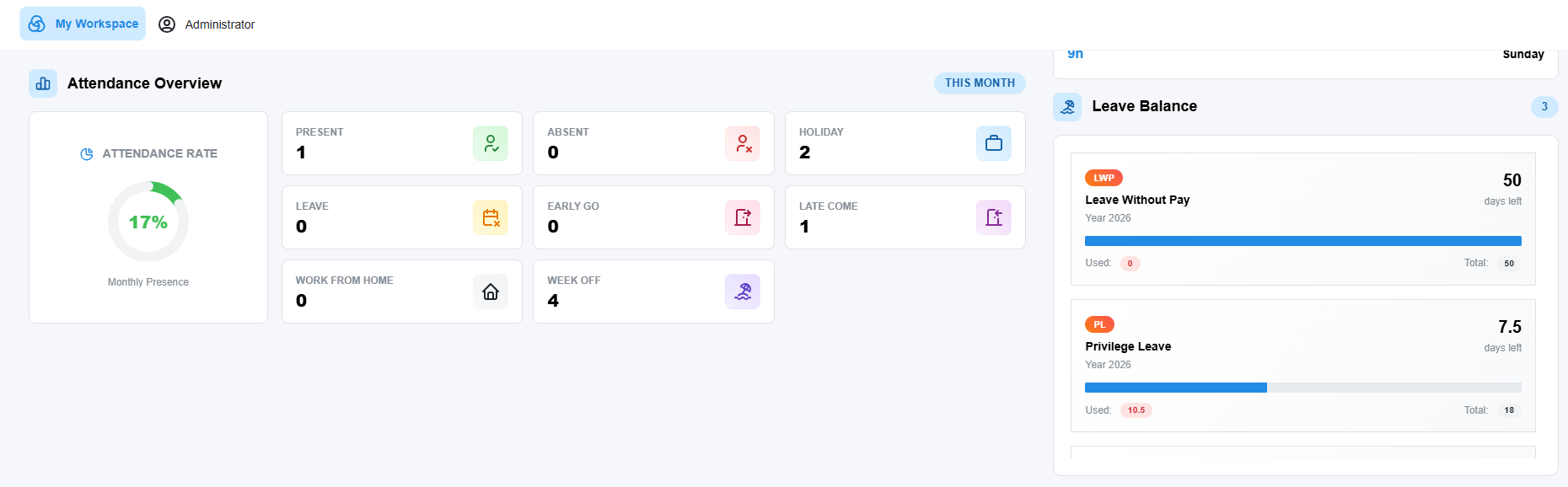
A dashboard widget provides a visual monthly attendance summary including an Attendance Rate gauge (circular/donut chart) and tile-based count breakdown: Present, Absent, Holiday, Leave, Early Go, Late Come, Work From Home, and Week Off.
1.6 Leave Balance Widget
Displays the employee's leave entitlement at a glance. Lists all leave types with year, total allotted days, used days, remaining days, and a color progress bar.
E.g., Below
|
Leave Type |
Total Days |
Used |
Remaining |
|
LWP (Leave Without Pay) |
50 |
0 |
50 |
|
PL (Privilege Leave) |
18 |
15 |
3 |
1.7 Leave Requests Widget
Shows recent leave request history with employee name/photo, submission date/time, duration (e.g., 0.5 working days), leave type badge, reason, approval chain, and approval status (Approved / Rejected / Pending).
1.8 Recent Attendance Widget
Displays the last few attendance records including date, location, In/Out timestamps, and total hours worked per day (e.g., 9h 10m).
1.9 Miss Punch Requests Widget
Shows the history of miss punch requests with date, requested IN/OUT times, reason, approval chain, and current status (Approved / Rejected).
PART 2 — Administrator Tab
The Administrator tab is designed for HR managers and administrators to oversee, manage, and report on organization-wide HR operations. It provides 6 core administrative applications.
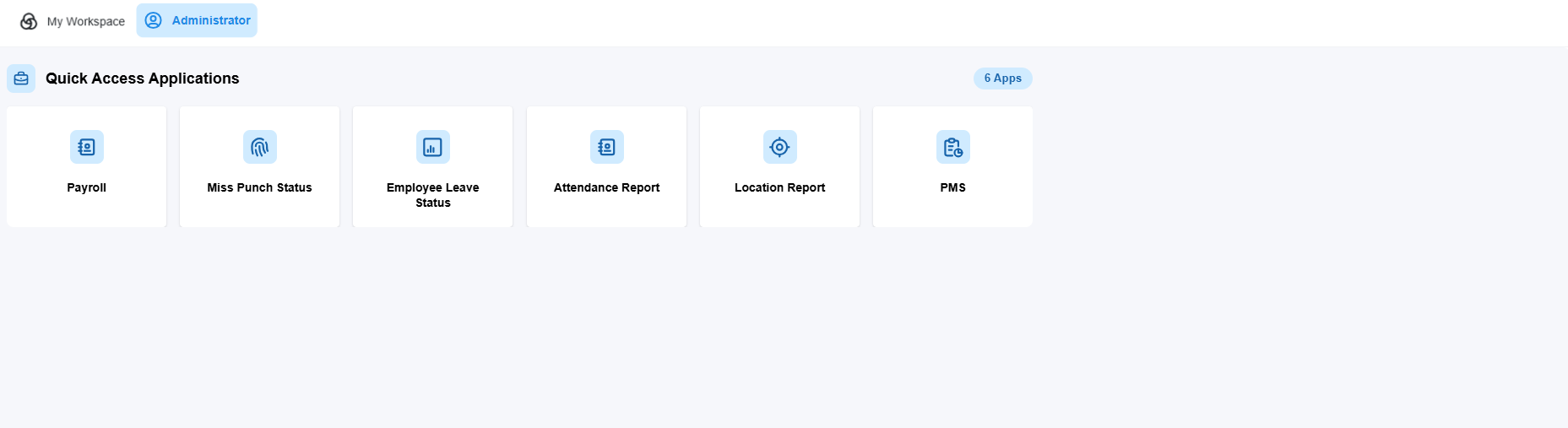
2.1 Payroll Module
A fully integrated payroll management system with the following sections:
|
Section |
Sub-Items |
Purpose |
|
Setup |
Salary Components, Salary Structures |
Define pay elements and structure templates per grade/department |
|
Employees |
Employee Salary, PF ESI & TDS Details |
Assign salaries and manage statutory deductions (PF, ESI, TDS) |
|
Run Payroll |
Payroll Run, Pay Slips |
Execute monthly payroll and generate/distribute pay slips |
|
Finance |
Loans & Adjustments, Full & Final |
Manage employee loans, salary adjustments, and exit settlements |
|
Compliance |
Compliance Config |
Configure settings to meet statutory/regulatory requirements |
|
Analytics |
Reports |
Generate payroll reports for analysis, audit, and management |
|
Settings |
Payroll Config, Audit Trail |
Configure pay cycles and view complete change audit logs |
2.2 Miss Punch Status (Admin View)
Administrators get an organization-wide view of all miss punch requests. The table includes:
· Employee requester name and ID
· Reason for the miss punch request
· Status — color-coded (Green = Approved, Red = Rejected)
· Multi-level approval chain columns (Level 1, Level 2, Level 3 Approver)
2.3 Employee Leave Status — Leave Analytics Calendar
A powerful calendar-based analytics view for administrators. Features include:
· Employee list on the left (name, ID, email)
· Calendar grid for the full month (dates as columns, employees as rows)
· Leave events shown with type (LWP, PL), status (Approved), and reason
· Filter by All Statuses or specific leave status
· Employee search, month navigation, Highlight Date feature, and Reload option
This gives HR a bird's-eye view of who is on leave on any given day, supporting workforce planning.
2.4 Attendance Report (Admin View)
The "Employees Attendance List" provides an organization-wide attendance overview:
· Color-coded grid — employees as rows, calendar dates as columns
· Status cells: P (Present), IN (Check-in time), WO (Week Off), and others
· Import Excel capability for bulk data uploads
· Per-employee detail view (eye icon) and search/filter functionality
2.5 Location Report
Provides geographic attendance tracking capabilities, allowing administrators to monitor employee attendance punch locations. Supports organizations with multiple offices or geo-fenced attendance systems.
2.6 PMS — Performance Management System
The PMS module provides tools for managing employee performance appraisals and reviews within the HRM platform, enabling HR and managers to track, evaluate, and document performance cycles across the organization.
Summary — Key Feature Matrix
|
Feature Area |
My Workspace (Employee) |
Administrator (HR) |
|
Dashboard KPIs |
Check-in, Attendance Rate, Hours, Leave Balance |
— |
|
Attendance Tracking |
Personal calendar & stats |
Org-wide employee grid & list |
|
Leave Management |
Apply leave, view balance & history |
Leave analytics calendar (all employees) |
|
Miss Punch |
Submit and track own requests |
Review and approve all org requests |
|
Payroll |
— |
Full payroll, pay slips, PF/ESI/TDS, loans |
|
Shift Management |
View own shift details |
— |
|
Task Management |
My Team Tasks |
— |
|
WFH Tracking |
Report For WFH |
— |
|
Resource Allocation |
Resource Allocation Report |
— |
|
Location Tracking |
— |
Location Report |
|
Performance |
— |
PMS (Performance Management System) |
|
Compliance |
— |
Compliance Config, Audit Trail |
|
Reports & Analytics |
Time Sheet Report |
Payroll Reports, Attendance Reports |
Key Design Principles
· Role-Based Dual-Tab Layout — My Workspace for employees, Administrator for HR ensures each user sees only what is relevant to their role.
· Quick Actions Panel — Reduces the number of clicks for the most common HR tasks (Apply Leave, Apply Miss Punch).
· Multi-Level Approval Workflows — Built into Leave and Miss Punch modules, creating an auditable chain of approvals.
· Real-Time Dashboard Widgets — Live attendance, shift, and leave data without requiring manual reporting.
· Color-Coded Status Indicators — Green for Approved, Red for Rejected, enabling fast visual scanning of large data sets.
· Calendar-Based Analytics — Leave and attendance shown on calendar grids for intuitive workforce planning.